

Migrating Groups and Projects to git.nrw
On this page
Summary
You can migrate your groups, including members (as placeholders) and projects, from your GitLab instance to git.nrw. Please note that top-level groups must be requested seperatly. In short:
- Be aware there are quota limits active in git.nrw.
- Create a private access token (api and read_repository) in the source GitLab
- Navigate to the group into which you want to import. Use the “Import group” function to connect your source GitLab instance.
- Migrate the desired groups.
- Assign placeholders in the Top-Level-Group
For a more detailed manual see below.
Step 1: Prerequisites
This guide describes a way to migrate your GitLab groups and projects to git.nrw via the direct transfer feature. Direct transfer can migrate your groups and repository data directly to git.nrw. Have a look to learn what is getting migrated and about the estimated migration duration . Be aware that your GitLab administrator may need to adjust some GitLab settings to make migration possible: Pre-Transfer requirements for GitLab administrators .
Step 1: Transfer Process
1. Setup Access Token
- Create an access token for your user in your GitLab instance (not git.nrw).
- The token needs at least api and read_repository scopes
2. Initiate Transfer
- Navigate to the group into which you want to import: https://gitlab.git.nrw/groups/
- Select Import group and click the link import an existing group:

- Enter your GitLab URL (1) and your access token (2) and hit connect instance (3):
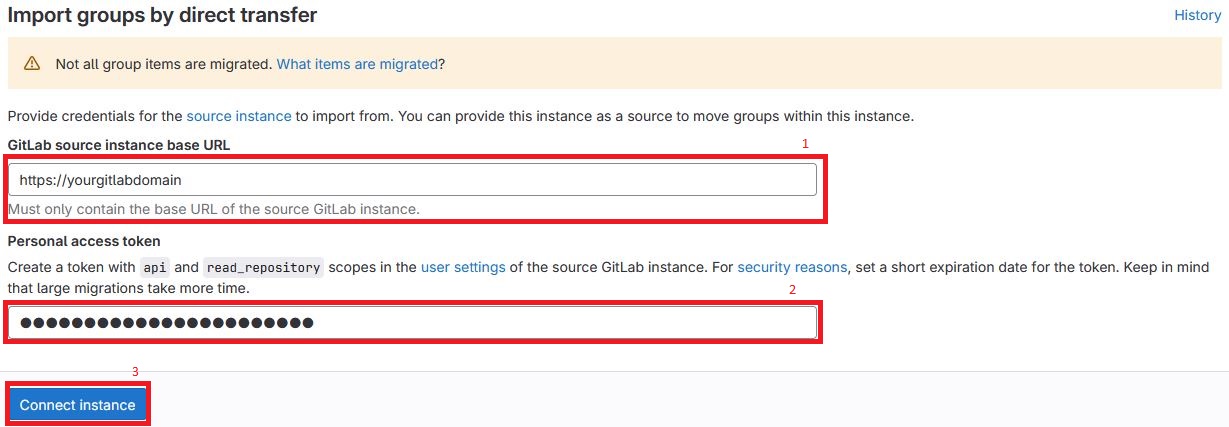
- Choose Source group to import (1), a parent group on git.nrw (2) and a groupname (3) and hit Import with projects (4) (alternatively you can “import without projects”):

- Next you can follow the progress of migration. This can take some amount of time, depending on how many projects are getting migrated. You will be informed by e-mail when the migration is done. Members also get an e-mail informing them about access to the new group on gitlab.git.nrw.
- For more information follow the official GitLab transfer guide: